Interactive Retail Installation
Interactive Retail Installation
Retail Installation: DropTrek Outdoors
An interactive retail installation designed to connect physical product interaction, touchscreen browsing, and mobile brand storytelling into one seamless experience.
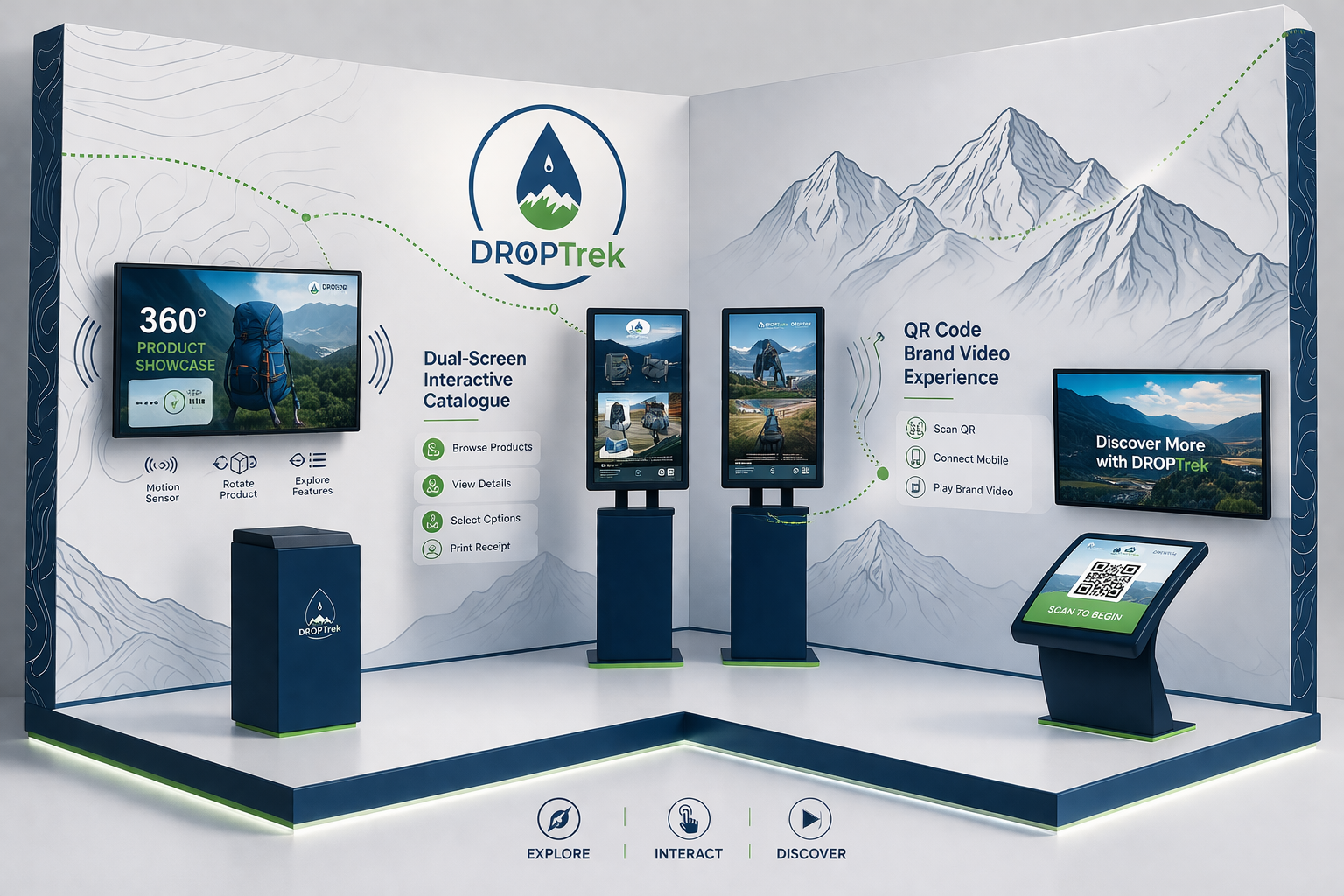
A full installation view introducing the in-store environment for the DropTrek Outdoors concept.
Project Overview
Digital interaction used to elevate product discovery inside a retail environment.
Summary
DropTrek Outdoors is a concept retail installation designed to explore how digital interaction can enhance in-store product discovery.
The installation combines gesture-controlled product exploration, touchscreen catalogue browsing, and QR-based brand storytelling to create an engaging customer journey across multiple interaction points.
Design Challenge
Balancing physical interaction, interface clarity, and branded motion across one system.
Designing this installation required balancing physical interaction, touchscreen interfaces, motion graphics, and mobile engagement into one connected experience.
One of the main challenges was ensuring users could understand how to interact with each station without written instructions. To solve this, visual prompts, motion-based cues, and idle screen animations were introduced to naturally guide engagement.
Another challenge was maintaining consistency across three interaction systems:
- Gesture-based product exploration
- Touchscreen catalogue browsing
- QR-based mobile video interaction
Although each station used a different interaction method, they were unified through shared typography, motion behaviour, and layout structure to create a cohesive retail experience.
The gesture-controlled 360° station required additional interaction hints so users immediately understood how to begin exploring the product.
The touchscreen catalogue required structuring a familiar browsing flow similar to modern e-commerce interfaces while remaining suitable for a physical retail installation.
The QR station extended the installation beyond the physical environment by connecting users directly to branded mobile video content.
Discoverability Without Instructions
Motion prompts, idle states, and spatial cues guide users into the interaction naturally.
Consistency Across Interaction Types
Typography, animation rhythm, and screen hierarchy keep three station types feeling like one brand experience.
Bridging Physical And Mobile
The QR touchpoint extends the installation into personal devices without breaking the retail journey.
Case Study Demo Video
Four-shot documentation designed to show both environment and interface response.
This demo video demonstrates how users interact with the installation across three stations using a structured four-shot documentation method:
Wide Shot
Interaction Shot
Close-Up Detail
Screen Recording
Installation Experience
Three connected stations guiding the user from discovery to deeper brand engagement.
The installation is designed as a connected sequence of three interaction stations that guide users from gesture-based product discovery to touchscreen browsing and finally into mobile brand engagement.
360° Product Showcase
Gesture-led interaction introduces the product with motion, rotation, and feature highlights.
Dual-Touchscreen Catalogue
Touch navigation supports browsing, selection, and detail review within a retail-ready interface.
QR Brand Video Experience
Mobile access extends the story beyond the installation with curated promotional video content.
Station 1
360° Product Showcase
This station uses gesture-based interaction powered by Leap Motion to allow users to explore a backpack in 360 degrees. As users move their hands across the sensor area, the product rotates dynamically while key features appear on screen through animated highlights.
Idle motion graphics attract attention when no interaction is detected, helping users understand where to begin.
Interaction Flow
- 01 User approaches display
- 02 Gesture detected
- 03 Product rotates in 360°
- 04 Features appear dynamically
Wide Shot
Wide Shot Image
Replace with a full view of the 360° product showcase station in context.
Interaction
Interaction Image
Replace with a close view of hand movement over the Leap Motion sensor.
Screen UI
Screen UI Image
Replace with the rotating backpack interface and animated feature callouts.
Station 2
Dual-Touchscreen Interactive Catalogue
This station allows users to browse garments, explore product details, select variations, and complete a confirmation flow through a dual-screen touchscreen interface.
The interaction model mirrors familiar e-commerce browsing behaviour while remaining optimized for physical retail engagement.
Interaction Flow
- 01 Browse catalogue
- 02 Select item
- 03 View product details
- 04 Confirm selection and print receipt
Environment
Station Environment Image
Replace with a wide view of the dual-touchscreen catalogue station.
Interface
Interface Screen Image
Replace with product browsing, detail view, or variation selection screens.
Interaction
Close Interaction Image
Replace with a close-up of touch interaction across the catalogue flow.
Station 3
QR Code Brand Video Experience
This station connects the physical installation with mobile brand storytelling. Users scan one of three QR codes to launch curated promotional videos on their personal devices.
This extends the experience beyond the display environment and reinforces brand identity through motion-driven content.
Interaction Flow
- 01 Scan QR code
- 02 Open mobile experience
- 03 Select video
- 04 Watch brand content
QR Display
QR Display Image
Replace with the branded QR station and its display layout.
Mobile Scan
Mobile Scan Image
Replace with a phone scanning the code and opening the mobile experience.
Playback
Video Playback Image
Replace with the selected brand video playing on the user’s device.
Design Workflow
Motion, interface design, illustration, and front-end prototyping working together.
This project combines motion graphics, interface design, illustration, and front-end interaction techniques to simulate a realistic retail installation experience.


 GS
GS


Used to create
- Promotional motion loops
- Gesture interaction hints
- Idle screen animations
- Feature highlight transitions
Used to design
- Touchscreen layouts
- Product showcase screens
- QR interaction visuals
- Installation presentation mockups
Used to create
- Gesture indicators
- Navigation icons
- Vector UI assets
- Branding graphics
Used to prototype
- Interaction transitions
- Screen reveal animations
- Motion timing behaviour
Used to structure
- Layout responsiveness
- Interaction sequencing
- Navigation logic
Outcome
A cohesive product discovery concept for modern interactive retail.
Final Result
The final installation concept demonstrates how physical retail environments can integrate gesture interaction, touchscreen browsing, and mobile engagement into one cohesive product discovery experience.
Project Value
The project showcases how motion graphics and interaction design can transform traditional retail displays into immersive storytelling platforms.